
QUESTION
In VAST LiveClient, I open Configuration -> Client Settings -> View Settings and select "same as local computer" in Date and Time Format field, but the view cell shows date in MM/dd/yyyy format. The format is not same as PC's date format dd/MM/yyyy.
How to make date format on LiveClient view cell same as system time?

How to make date format on LiveClient view cell same as system time?
ANSWER
Please do below steps on PC to solve this issue.
1. Go to Control panel -> Clock, Language and Region and open Region.
2. Make sure the country in Administrative is same as Formats, as below.
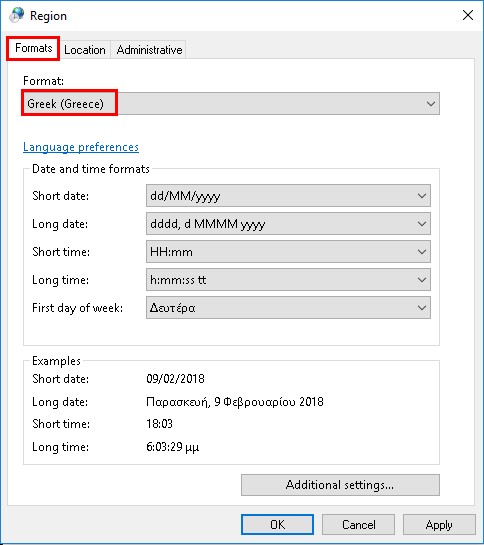
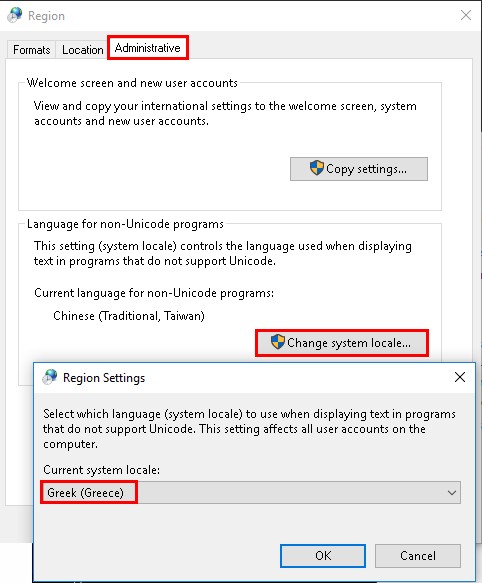
1. Go to Control panel -> Clock, Language and Region and open Region.
2. Make sure the country in Administrative is same as Formats, as below.
Comments
0 comments
Article is closed for comments.