
Question
How to use the HTTP tunnel?
Answer
Introduction
HTTP Tunnel is a useful technique that can improve response times when using CGI commands, even if the camera is accessed over the Internet. This document on how to take advantage of HTTP Tunnel is divided into three sections:
- What is HTTP Tunnel?
- What are the benefits?
- How to set up an HTTP Tunnel?
What is HTTP Tunnel
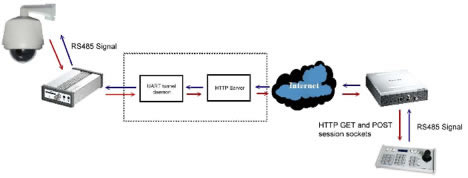
An HTTP Tunnel is composed of two TCP connections: one established through a GET request and one established through a POST request. The tunnel uses an FIFO queue to store incoming UART commands, and can send a response from the UART device to the tunnel client. In addition, the target device can be updated without the need to establish another HTTP Tunnel.
A UART HTTP Tunnel is used to forward the commands transparently from the tunnel client to the server.
As for responses from the UART device, the HTTP Tunnel server will forward them to the client. Using the tunnel mechanism, the client is able to send custom commands to the device even if the server doesn't natively support the protocol.
Figure 1 shows a typical application scenario for an HTTP Tunnel.
What are the benefits
1.
Only need to connect once, and provides real-time communications. The HTTP Tunnel only needs to be created once. Conventionally, clients can control a video server/network camera via certain CGI commands, but this method does not provide real-time communications because the overhead for establishing a TCP connection for each CGI command is considerable. In contrast, an HTTP Tunnel connection is persistent, so that a TCP connection does not need to be re-established each time a message is transmitted.
2.
Can traverse firewalls - Because an HTTP tunnel uses the HTTP protocol, only the HTTP port is forwarded. The connection can traverse a firewall, but is compliant with HTTP authentication protocols if security is a concern. These characteristics allow the video server/network camera to be managed more efficiently and systematically.
How to set up an HTTP Tunnel
By using an HTTP Tunnel, an RX7101 with attached keyboard can be used to control the dome behind a VS7100. Alternatively, a program can be written to control a camera attached to a dome or scanner. These two approaches are described below.
1.Controlling a VS7100 from an RX7101
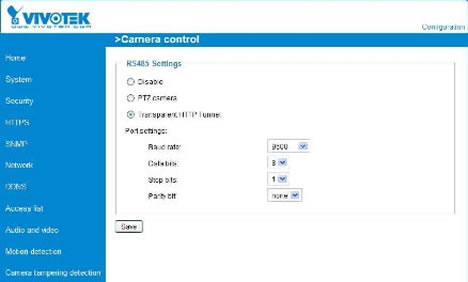
1.Configuring the VS7100 - Go to the Camera control page in the VS7100's interface, then select "Transparent HTTP Tunnel" and save.
2.Configuring the RX7101 - For the RX7101, connect the keyboard and configure the keyboard on the I/O page.
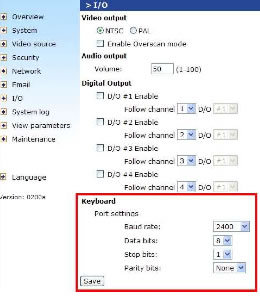
Note: Because the RX7101 only supports the Pelco-D keyboard, a PTZ dome that supports the Pelco- D protocol must be used to connect to the VS7100 as well.
2.Programmatic control
- Refer to documentation - Documentation on how to write a program to control the PTZ dome behind a video server or camera attached to a scanner is available in attachment.
Comments
0 comments
Article is closed for comments.